SCIMO TV Ambient-Light: Surround LEDs
Additional surround LEDs (DMX512-based)
Technical project documentation for SCIMO TV Ambient-Light: Surround LEDs, revised for clearer language, consistent structure and easier reference.
SCIMO allows you to activate an additional surround LED channel which works independently of digital LED strips placed behind TV. This surround channel is intended to be used as a light source at the back of the room whose color is calculated from the average color of the full TV screen image.
Unlike normal LED output (digital LED strips behind TV) this channel delivers its data only as DMX512 protocol. To connect some simple RGB LED strips to this channel an adddtional converter is needed: DMX512 to RGB converter. This converter can be obtained at moderate price for about 20€ and is able to drive 3 x 4 A at 12V which allows you to connect 5 meter and more of simple LED strips. Also those simple RGB LED strips can be obtained for less than 5€ per meter, so overall material cost won't be very high.
To connect a DMX512 based system to SCIMO an additional board is needed where some simple signal adaption is done: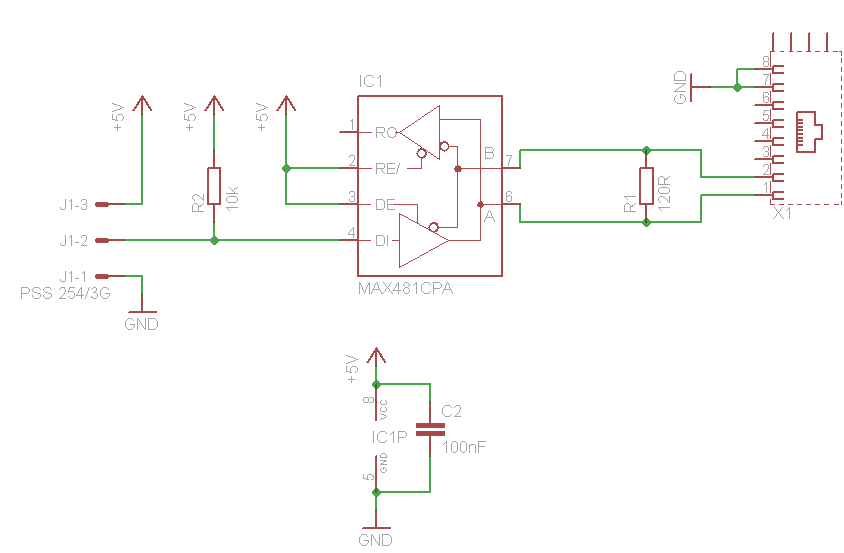
Plug on left side (input) is connected to SCIMO where:
- Pin1 = SCIMO LED connector Pin "GND"
- Pin2 = SCIMO LED connector Pin "clk"
- Pin3 = SCIMO LED connector Pin "5V"
On right side (output) I have added RJ45 connector that an common CAT5 cable can be used for data transmission. Also most of DMX512 to RGB converter are having RJ45 connector so that wiring should be easy and cheap.
available paramters for surround LEDs
| parameter name | default value | example | possible values | description |
|---|---|---|---|---|
| LEDS_SURROUND | 0 |
[LEDS_SURROUND] Val=1 |
0, 1 | activate/deactivate surround LED channel 0 = inactive 1 = active |
| GammaCorrection_Sur | 1.9 |
[GammaCorrection_Sur] Val=1.9 |
0.50 - 5.00 | This value has big influence on behavior, a lower value (e.g. "1.6") has the effect of smoother color mixing and is more relaxed for eyes. A bigger value (e.g. "2.2") gives more exciting color effects with sharper and saturated colors, which is for example nice at action games. This value also has a strong influence on color matching to TV. |
| BrightnessMin_Sur | 1.0 |
[BrightnessMin_Sur] Val=1.0 |
0 - 100 % | LEDs won't set darker than this value, helps to keep a minimum of brightness which is more relaxed for eyes. |
| BrightnessMax_Sur | 100.0 |
[BrightnessMax_Sur] Val=100.0 |
0 - 100 % | LEDs won't set brighter than this value, useful if LED strips equipped with very bright LEDs. |
| RedCorrection_Sur | 1.00 |
[RedCorrection_Sur] Val=1.00 |
0.00 - 1.00 | useful to fine-tune colors from LED strip to match colors from TV. |
| GreenCorrection_Sur | 1.00 |
[GreenCorrection_Sur] Val=1.00 |
0.00 - 1.00 | |
| BlueCorrection_Sur | 1.00 |
[BlueCorrection_Sur] Val=1.00 |
0.00 - 1.00 | |
| Color_Averaging_Sur | 10.0 |
[Color_Averaging_Sur] Val=10.0 |
0.0 - 20.0 | By increasing this parameter a more averaged color mixing (averaged over time) is output to LEDs. 0 = no averaging |
KeiAng
Published on: Wednesday, 14. September 2016 (6760 reads)
Copyright © by Keiang Electronics & Measurement

[ Go back ]